
Power Query dataflows like to use GUIDs to reference workspaces, lakehouses and warehouses. With a GUID reference, you are authoritatively referencing a specific resource, which is good…but working with GUIDs can entail complications, both for humans and CI/CD, which is not so good.
I know what lakehouse “SomeLakehouse” is, but I’ll have to look up what lakehouse “fb7322d6-781e-4e0a-97b1-1eec69a5547b” is. On the source control side, I find that, due to how GUIDs tend to be intermixed with other code in Power Query, Git often incorrectly wants to merge dev workspace GUIDs to test, or test-specific GUIDs to prod. If not caught by careful human PR/merge review, such inadvertent merges leads to bad things happening.
Can we use names instead of GUIDs? That would resolve at least part of the challenge. Our code could refer to “SomeLakehouse” instead of a GUID (nice!).
However, switching from GUIDs to names still leaves the need to update workspace references when a dataflow is promoted across workspaces (e.g. from dev -> test -> prod.) Is there a way to reference the current workspace, regardless of its name?
The answer is yes to both! Using names instead of GUIDs isn’t new, but hasn’t often been done. On the other hand, relative workspace references is a brand-new, in preview feature.
Let’s explore both, in code!
GUIDs -> Names
Traditionally, if you use the GUI to get data from a lakehouse or warehouse, code along the lines of the following will be generated for you. (Of course, it will be a little different for a non-schema-enabled lakehouse or for a warehouse, but close.)
let
  Source = Lakehouse.Contents([HierarchicalNavigation=true]),
  Navigation = Source{[workspaceId = "3cd646fa-5e14-44d5-a5ac-611b35f5cac3"]}[Data],
  #"Navigation 1" = Navigation{[lakehouseId = "fb7322d6-781e-4e0a-97b1-1eec69a5547b"]}[Data],
  #"Navigation 2" = #"Navigation 1"{[Id = "dbo", ItemKind = "Schema"]}[Data],
  #"Navigation 3" = #"Navigation 2"{[Id = "SomeTable", ItemKind = "Table"]}[Data]
in
  #"Navigation 3"
Focusing our attention on the first line with a GUID, specifically the {…} part, an item selection is being performed on Source. A record is given whose field names define the columns to search and whose field values define the column values to search for. The table is searched for a matching row—and there must be exactly one, otherwise an error will be raised—which will be returned as the result of this part of the expression.
Can we switch this item selection from searching for a GUID to a workspace name? Absolutely! Let’s look in table Source (perhaps by previewing it in query editor). We see that it includes column “workspaaceName”.

This is what we’re looking for! All we need to do is revise the line with the workspace item selection to search by name instead of GUID:
Navigation = Source{[workspaceName = "Something - Dev"]}[Data],
Following a similar process, we can refactor out the second GUID reference. Currently, it identifies a lakehouse by GUID. Looking at the table named Navigation, we see there’s a “lakehouseName” column we can use. This line of code becomes:
#"Navigation 1" = Navigation{[lakehouseName = "SomeLakehouse"]}[Data],
Put together, the revised expression:
let
  Source = Lakehouse.Contents([HierarchicalNavigation=true]),
  Navigation = Source{[workspaceName = "Something - Dev"]}[Data],
  #"Navigation 1" = Navigation{[lakehouseName = "SomeLakehouse"]}[Data],
  #"Navigation 2" = #"Navigation 1"{[Id = "dbo", ItemKind = "Schema"]}[Data],
  #"Navigation 3" = #"Navigation 2"{[Id = "SomeTable", ItemKind = "Table"]}[Data]
in
  #"Navigation 3"
Much improved! As humans, names are much easier to recognized than GUIDs. The above is easier to read—to review and ensure correctness of—than the GUID-based version we started with.
However, it still references a specific workspace. When this dataflow is promoted to test, and then later to prod, the relevant bit of code will still have to be updated to adjust the workspaceName to point to the correct workspace. Is their an alternative?
Relative to the Current Workspace
A common pattern is for a dataflow to live in the same Fabric workspace as the lakehouse it references. If only we had some way to have the Navigation step reference the current workspace—that is, the workspace where the dataflow lives—regardless of its name or GUID….
Recently, this became possible! Now, an additional row is included in Lakehouse.Content()‘s output, representing the current workspace as workspaceId = “.”. That is, the current workspace is listed twice in the output of Lakehouse.Contents(): once in a row showing its name and GUID, and a second time in a row with workspaceId = “.” and a placeholder name, currently “!(Current Workspace)”.

The necessary code change is simple: Update the item selection that finds the workspace to look for workspaceId = “.”:
let
  Source = Lakehouse.Contents([HierarchicalNavigation=true]),
  Navigation = Source{[workspaceId = "."]}[Data],
  #"Navigation 1" = Navigation{[lakehouseName = "SomeLakehouse"]}[Data],
  #"Navigation 2" = #"Navigation 1"{[Id = "dbo", ItemKind = "Schema"]}[Data],
  #"Navigation 3" = #"Navigation 2"{[Id = "SomeTable", ItemKind = "Table"]}[Data]
in
  #"Navigation 3"
This let expression now uses a relative reference and a reference by name to read data from SomeLakehouse that resides in the same workspace as the dataflow. No need to change code if the dataflow and lakehouse are moved to another workspace. When deploying from dev -> test or test -> prod, the expression stays exactly the name—no workspace-specific GUIDs to update.
This approach also works when writing data: relative and name-based referenced can be used for writing, as well. It’s possible to have a dataflow that reads and writes in the current workspace to items referenced by name, and so which is deployable to other workspaces without any code changes. Yay to less merge challenges!
In the GUI?
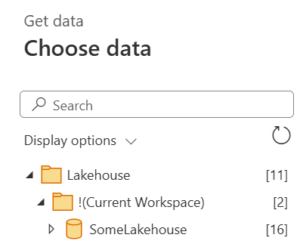
Our focus has been code-centric, but that doesn’t mean you can’t instead use an IDE. Power Query Online’s GUI will, in the appropriate places, allow you to choose “!(Current Workspace)” when navigating the workspace list, which it will write into code as workspaceId = “.”. Then, when it generates code as you navigate under that workspace entry, it will switch from generating GUID-based to name-based references for the chosen lakehouse or warehouse. Nice!
Conclusion
I like the simplicity of this approach! If all that’s needed is simply to reference a named item relative to the current workspace, there’s no complexity. No need to define variables or pass parameters. True, you’ll need to update the named reference if the referenced item is renamed, but that doesn’t seem like an unreasonable ask. All and all, much less painful than working with GUIDs.