
If you’ve defined joins for any length of time, you’re likely familiar with left, inner and full joins, and perhaps even right joins (opposite of a left join). But these aren’t the only kinds of joins out there. There are several others which, while their names may not be as familiar, still have practical applications for real-life business scenarios. Let’s explore several of these, including how to do them in Power Query!
Series Index
- Deep Dive Into Joins (Part 1): Join vs. Nested Join
- Deep Dive Into Joins (Part 2): Not So Common, But Real-World Useful [this post]
Semi-Joins
An inner join a) finds all rows in the left table that join to the right table, then b) pairs the matching rows together.
But what if we want just the first part of that process—just the “a) finds all rows from the left table that join to the right table” part? We don’t need data from the rows in the right table, nor do we need the left rows returned multiple times if they join to multiple rows in the right table (row multiplication); we just want the rows from the left table that pair with rows in the right table. To say it another way, we want to filter the rows in the left table based on whether they join to the right table. All we want is data from the left table, but based on whether it pairs with the right table.
Imagine a customers table and an orders table. You want to filter customers to just those who have placed at least one order. If we use join terminology, customers is our left table and orders is our right table. You want all rows from the left table that join to the right, but you don’t want data from the right table or row multiplication to occur. You just want the rows from the left if they pair to the right.
This is a semi-join. Specifically, it’s a left semi-join—left because you only want values from the left table to be returned.
SQL does not have a special join keyword for semi-joins. Instead, in SQL, you can perform a semi-join using EXISTS:
SELECT *
FROM Customers c
WHERE EXISTS (SELECT * FROM Orders o WHERE o.fCustomerId = c.CustomerId)
Another option would be to use IN:
SELECT *
FROM Customers c
WHERE c.CustomerId IN (SELECT o.fCustomerId FROM Orders o)
There are a bunch of different ways you could achieve a similar effect in Power Query. For example, the last SQL example transposes to M code along the lines of the following:
Table.SelectRows(Customers, each List.Contains(Orders[fCustomerId], [CustomerId]))
But this isn’t the only way to do a semi-join in Power Query. Turns out, in Power Query, a left semi-join is rather similar to a nested inner join that isn’t expanded, where the nested table column is instead just removed.
let
  NestedJoin = Table.NestedJoin(Customers, {"CustomerId"}, Orders, {"fCustomerId"}, "Orders", JoinKind.Inner),
  RemoveNestedTableColumn = Table.RemoveColumns(NestedJoin, {"Orders"})
in
  RemoveNestedTableColumn
Not too bad…but it might involve too much work being done. Depending on how Power Query and the underlying data connector optimize the above, the full effort to get rows from the right table might still take place behind the scenes even though those rows are never directly accessed or expanded out.
If there was only some way we could indicate up front that we just want a semi-join; that the row values from the other table aren’t needed…. And there is! Change the join kind (Table.NestedJoin‘s sixth argument) from JoinKind.Inner to JoinKind.LeftSemi. Now, we’re declaring exactly what we want, information that can be used to produce the desired output in the most efficient way possible.
let
  NestedJoin = Table.NestedJoin(Customers, {"CustomerId"}, Orders, {"fCustomerId"}, "Orders", JoinKind.LeftSemi),
  RemoveNestedTableColumn = Table.RemoveColumns(NestedJoin, {"Orders"})
in
  RemoveNestedTableColumn
(Technically, we don’t need to remove the nested column above, but leaving a column that will never contain data seems pointless, so we get rid of it to produce cleaner output.)
In addition to JoinKind.LeftSemi, there’s also JoinKind.RightSemi. When used with Table.NestedJoin, its output may seem a bit strange: A single row where all columns from the left table contain null; only the nested table column contains a value: a (nested) table containing all rows from the right table that pass the semi-join. While odd, this is correct. With a right semi-join, only the data from right table’s rows should be returned (e.g. if customers is right semi-joined to orders, we’d get back just those orders that join to a customer)…and, as always with a nested join, the right table rows are nested into the nested table column. To get them into a non-nested form, you’ll need to expand the nested table column. (If you’d rather avoid this oddness, change the right semi-join into a left semi-join by swapping which table is left and which is right.)
JoinKind.LeftSemi and JoinKind.RightSemi work with Table.Join, as well. When used with Table.Join, columns from both left and right tables are included in the output (as they would with other join kinds) but those from the right table (for a left semi-join) or left table (for a right semi-join) will have their values all set to null.
let
  NestedJoin = Table.Join(Customers, {"CustomerId"}, Orders, {"fCustomerId"}, JoinKind.LeftSemi),
  RemoveRightTableColumns = Table.RemoveColumns(NestedJoin, Table.ColumnNames(Orders))
in
  RemoveRightTableColumns
To recap, a semi-join is a way of filtering. For the chosen side (left table, for a left semi-join; right table, for a right semi-join), only those rows that join to the opposite table are returned. Unlike left, right, inner, and full joins, with a semi-join, each row is returned at most one time, regardless of how many rows it joins to (so row multiplication does not occur).
Anti-Joins
All customers that join to at least one order…that’s a left semi-join. But what if we want the opposite? What if we want all customers that don’t join to at least one orders row—all customers who have yet to place an order?
Meet the anti-join! A left semi-join returns all rows in the left table that join to at least one row in the right table. A left anti-join returns all rows in the left table that do not join to any rows in the right table. (Similarly for a right anti-join, except that it only returns rows from the right table that don’t join to the left table.)
To perform an anti-join in Power Query, try JoinKind.LeftAnti or JoinKind.RightAnti, as appropriate.
Suppose we want all customers with no orders:
let
  NestedJoin = Table.NestedJoin(Customers, {"CustomerId"}, Orders, {"fCustomerId"}, "Orders", JoinKind.LeftAnti),
  RemoveNestedTableColumn = Table.RemoveColumns(NestedJoin, {"Orders"})
in
  RemoveNestedTableColumn
(This example, as well as the next one, contain the exact same code as the corresponding previous examples, except that the join kinds have been changed.)
Or if we want to use Table.Join:
let
  NestedJoin = Table.Join(Customers, {"CustomerId"}, Orders, {"fCustomerId"}, JoinKind.LeftAnti),
  RemoveRightTableColumns = Table.RemoveColumns(NestedJoin, Table.ColumnNames(Orders))
in
  RemoveRightTableColumns
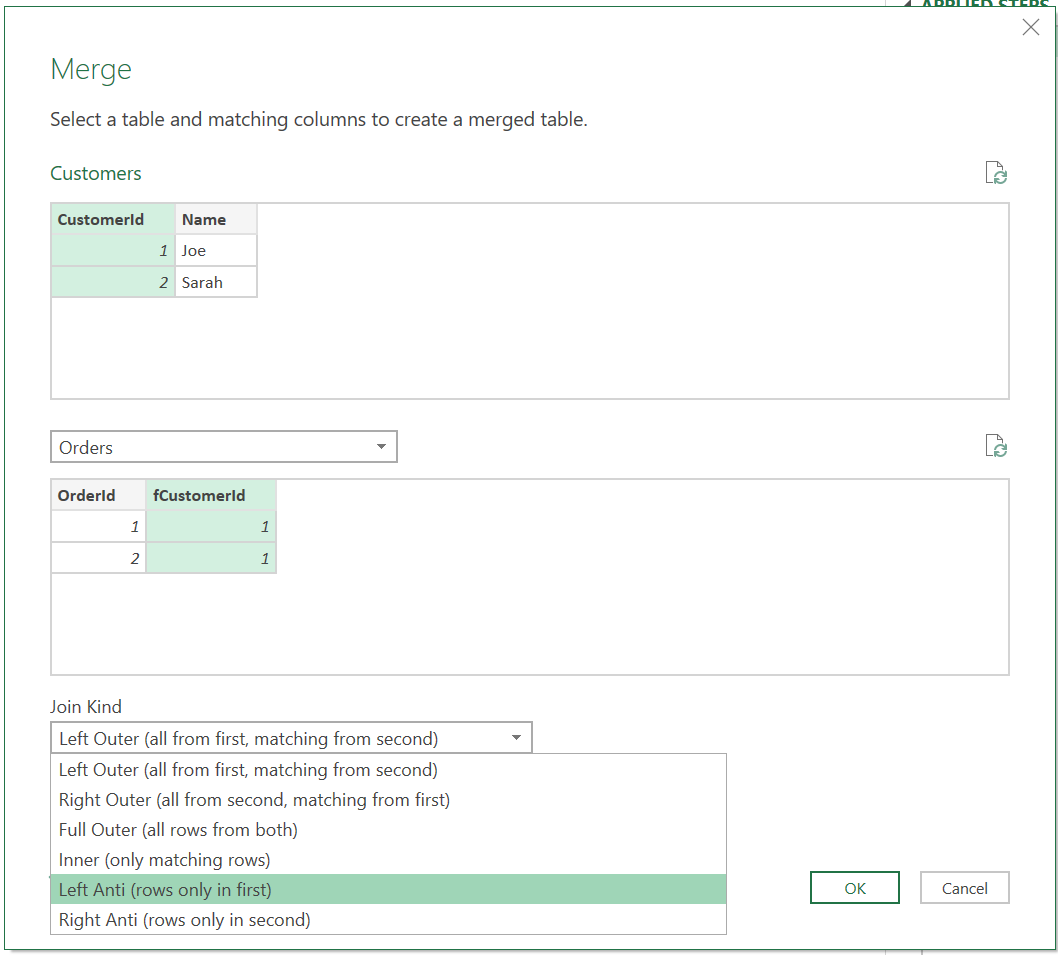
Anti-joins can also be created using the GUI query editor, by using its join kind dropdown. Semi-joins, on the other hand (at least as of the time of this writing), aren’t an option provided there, so require hand-editing code.
Cross Join (Cartesian Product)
Another not-as-common but business useful type of join: A cross join—a join which pairs each row from the left table with every row from the right table. If the left table contains two rows, A & B, and the right table contains two rows, 1 & 2, a cross join will output the following row pairings: A-1, A-2, B-1, B-2.
Why might you want to join all rows on one side with all rows from the other? One possibility might be building a dimension table. Imagine you’re building a job attribute dimension, which should contain attributes Job Kind (rebuild, restore, new manufacture, etc.), and Is Complete (true or false). As a given job fact can have any job kind, and can be either complete or incomplete, each Job Kind should be paired with both possible Is Complete values. A cross join can make this happen!
Power Query doesn’t provide a specific cross join JoinKind or function. Instead, we can pull one off by adding a column to the left table that contains a nested table with the values to be cross joined (the right table). Then, expand the just-added nested table column.
let
  LeftTable = #table(type table [Job Kind = text], { {"Rebuild"}, {"Restore"}, {"New Manufacture"}}), // perhaps pull from a configuration table instead
  RightTable = #table(type table [Is Complete = logical], { { true }, { false } }),
  AddNestedCrossJoinColumn = Table.AddColumn(LeftTable, "RightTableCrossJoin", each RightTable, Value.Type(RightTable)),
  ExpandedCrossJoin = Table.ExpandTableColumn(AddNestedCrossJoinColumn, "RightTableCrossJoin", {"Is Complete"})
in
  ExpandedCrossJoin
(Advanced tidbit: When adding the RightTableCrossJoin column, we used the fourth argument of Table.AddColumn to set the new column’s type to be the type of RightTable. This way, when that column is expanded in the next step, Power Query knows the correct type to use for the just expanded table columns.)
Here, the table we cross-joined to contains just one column, but that’s just our example. The right table can contain any number of columns.
Will you construct a cross-join every day? Probably not, but cross joins have real-life applications, so are handy to know about and to know how to code up. You quite possibly may use them on occasion.
There we have it: Three less common but still practically useful join kinds to keep in your toolbox!