
Alphabetical sorting is simple: A comes after B, next comes C, then D and so on all the way to Z…right?!
If only it were so easy! Consider the character Á—should it be sorted before A, after A or just like it was A (ignoring the accent)? The answer depends on language: Hungarian’s Á comes after A; in Spanish, the accent should be ignored. In many languages, Y comes between X and Z; however, Lithuanian orders Y before J. French has an interesting twist: sometimes strings are sorted by first comparing their letters from left to right then by comparing diacritics from right to left. Some languages even treat certain multi-character combinations as single letters, like CD in Welsh. If this doesn’t sound complex enough, alphabetization rules can change: for example, in 1994, the Congress of the Association of Spanish Language Academies decreed that Spanish’s CH would no longer be considered a single, muilt-character letter combination!
The set of rules defining how Microsoft SQL Server should sort and compare character strings is known as a collation. Collation also determines the code page used for non-Unicode strings. Each SQL Server instance is configured to use a specific collation. This setting can be overridden at the database, table/view and individual column levels. Queries can mandate use of a particular collation via T-SQL’s COLLATE clause.
By changing the collation, you can fine-tune string comparison rules and adjust alphabetization.
Examples
Ordering
Suppose we have a list of words. Ordering them with the Latin1_General_CI_AI collation puts them in reasonable alphabetical order from the perspective of a native English speaker.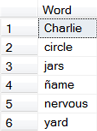
SELECT *
FROM Words
ORDER BY Word COLLATE Latin1_General_CI_AI
--ORDER BY Word COLLATE Modern_Spanish_CI_AI
--ORDER BY Word COLLATE Traditional_Spanish_CI_AI
--ORDER BY Word COLLATE Lithuanian_CI_AI
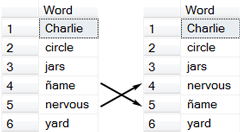
Latin1_General_CI_AI (left); Modern_Spanish_CI_AI (right)
Switch to Modern_Spanish_CI_AI and the order of ñame and nervous reverses. When sorting Spanish text, accents should be ignored; however, ñ is considered distinct letter considered a distinct letter that is sorted after n.
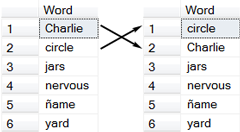
Modern_Spanish_CI_AI (left); Traditional_Spanish_CI_AI (right)
Using Traditional_Spanish_CI_AI reverses circle and Charlie. Traditional Spanish treats CH as a single letter, ordered after C and before D.
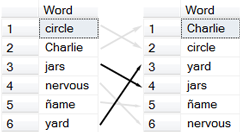
Traditional_Spanish_CI_AI (left); Lithuanian_CI_AI (right)
Change to Lithuanian_CI_AI. Notice that yard comes before jars. (Imagine! Y before J!) The other words are ordered as they were when we started.
Case-(In)Sensitivity
Collation also controls case-sensitivity, both of sorting and comparison. We often think that SQL Server is case-insensitive. This behavior is not intrinsic; rather, it’s determined by the collation being used.

Case-Insensitive (_CI)

Case-Sensitive (_CS)
The filter LIKE ‘C%’ returns Charlie and circle when evaluated with Latin1_General_CI_AI (the _CI indicates case-insensitive) but only Charlie when Latin1_General_CS_AI is used (_CS signifies case-sensitive).
SELECT *
FROM Words
WHERE Word LIKE 'C%' COLLATE Latin1_General_CI_AI
--WHERE Word LIKE 'C%' COLLATE Latin1_General_CS_AI
Further Reading: Wikipedia’s Alphabetical order (In particular, the “Language-specific conventions” section gives many examples of how languages differ in their ordering of letters.)
Hey,
I am working for a investment company and we are migrating our database from one environment to another.
I need to know if there is some way i can compare my data that comes from multiple tables to the target table.
The source tables are in DB1 and the target table is in DB2
and i am not allowed to use db links.
Second constraints is i cannot get any online tools being installed
Is there a way that i can use some queries .
excel comparison would not be helpful as the data size is huge.
Can you help..
Thanks,
Anand
Hum…looks like some creativity is in order. Comparing the data server-side is probably preferable to downloading all the data locally. A linked database server would be nice but apparently that’s not an option. Are you able to use OPENQUERY? If you can, maybe something like
SELECT * FROM localtable EXCEPT SELECT * FROM OPENQUERY(...)will help.Doing the comparisons by hand client-side in Microsoft Excel certainly isn’t ideal. If you must check things client-side and downloading tools isn’t an option, what about writing a VBA macro in Excel to do the comparison and only output rows where there is a difference?