
In its plain vanilla form, GROUP BY applies aggregate functions to groups of data, returning one result row per data group. Did you know that it can do more than this? Let’s explore the possibilities!
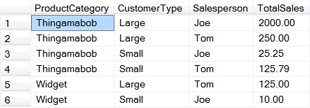
Suppose we want the sum of sales for each product category, customer type and salesperson combination. A basic GROUP BY clause—the kind we’ve been writing since SQL 101—produces the desired results:
SELECT ProductCategory, CustomerType, Salesperson, TotalSales = SUM(Total)
FROM SaleSummary
GROUP BY ProductCategory, CustomerType, Salesperson
Rolling Up
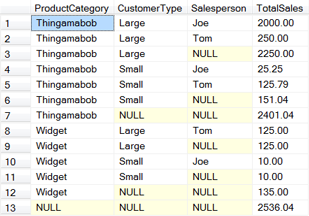
What if we also want to compute totals for each level in the GROUP BY hierarchy? That is, in addition to producing a total for each category/type/salesperson, we want a total for each category/type, a total for each category and a grand total.
GROUP BY’s ROLLUP clause provides this functionality. ROLLUP climbs the specified grouping list, summarizing each level as it goes.
SELECT ProductCategory, CustomerType, Salesperson, TotalSales = SUM(Total)
FROM SaleSummary
GROUP BY ROLLUP(ProductCategory, CustomerType, Salesperson)
Computing the Cube
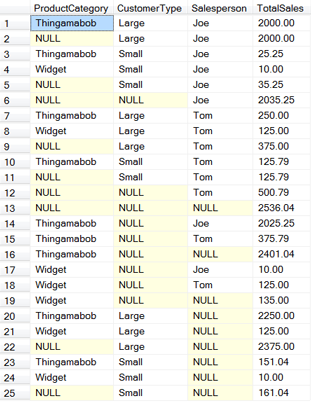
ROLLUP summarizes as it moves up the grouping hierarchy. What if aggregating totals for other combinations, those not produced by ROLLUP‘s linear upward progression, are also of interest? Swap CUBE for ROLLUP and summaries for all possible grouping permutations are produced.
SELECT ProductCategory, CustomerType, Salesperson, TotalSales = SUM(Total)
FROM SaleSummary
GROUP BY CUBE(ProductCategory, CustomerType, Salesperson)
Fine-Grained Control
If ROLLUP and CUBE both don’t return the desired groupings—perhaps ROLLUP leaves out some combinations of interest while CUBE returns too many—a explicit list of the groupings to summarize can be specified via GROUPING SETS.
SELECT ProductCategory, CustomerType, Salesperson, TotalSales = SUM(Total)
FROM SaleSummary
GROUP BY GROUPING SETS(
  (ProductCategory, CustomerType, Salesperson),
  (ProductCategory, Salesperson),
  CustomerType,
  Salesperson,
  () -- outputs a grand total row
)

Mix and Match
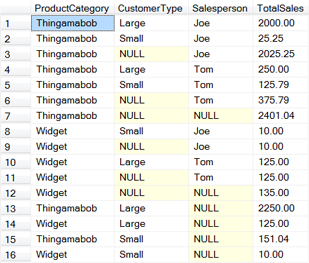
ROLLUP, CUBE, GROUPING SETS and unadorned grouping lists can even be combined to control which tabulations are returned.
SELECT ProductCategory, CustomerType, Salesperson, TotalSales = SUM(Total)
FROM SaleSummary
GROUP BY ProductCategory, CUBE(CustomerType, Salesperson)
Good and informative