
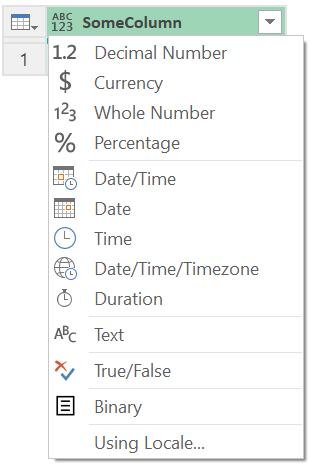
Power Query’s column types can be confusing. You can create or ascribe a column with any type—regardless of the kind of values in the column—and Power Query won’t complain, nor will the values in the column be transformed to the specified type. On the other hand, use Power Query’s “change type” functionality and the chosen column type does have an impact, causing values to be converted, as appropriate, and raising validation errors when that can’t be done.
Why does Power Query only sometimes care about column types? How do we make sense out of the seemingly contradictory behavior where types for columns matter when specified in one place (change type) but not in others (creation, ascription)?
Column Types Have No Effect
Let’s start our exploration with a big picture question: What does the Power Query mashup engine need to know about a table’s structure in order to work with it?
Simple: How many columns it has and what their names are. That’s it. From the functionality perspective, the mashup engine does not need to know—nor does it care—what the types of the columns are.
Why not? In M, the type that matters is always the type of the individual value, never a type on the “thing” holding the value. Variables don’t have types. From the functionality perspective, it’s as though columns don’t have types, either. The type of each individual value in the column is what matters to the mashup engine.
This is way you can create a table with a column type that is clearly incorrect and the mashup engine doesn’t complain, nor does attempt to conform the values in the column to match the specified type:
let
  Table = #table(
      type table [DoesNotActuallyContainNumbers = number],
      {
        { "hello" },
        { true },
        { #date(2025, 12, 25) },
        { #duration(5, 3, 0, 30) }
      }
    )
in
  Table
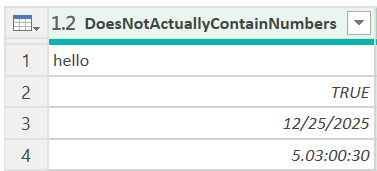
Also, this is why ascribing a new type—any new type—onto a column is accepted without complaint, regardless of the kind of values in the column. The column’s values won’t be changed, converted or validated because of the ascription.
Value.ReplaceType(Table, type table [DoesNotActuallyContainNumbers = datetimezone])
In both examples, Power Query is just fine with the incorrect column type. The column’s type has no effect on how the mashup engine processes the table. It works with the table as though there was no such concept as a column type.
Why Do Column Types Exist?
If column types don’t matter to the mashup engine, then why are they part of Power Query? There must be a reason M allows them to be specified, otherwise support for them wouldn’t have been added to the language.
M’s implementation of types can be divided into two parts:
- Necessary Information—Types track information the mashup engine needs to do its job.
- Courtesy Information—Types also provide “courtesy” mechanisms for conveying extra information—bonus information which is irrelevant to the mashup engine but which may be of interest to others (humans, code you or others write, tooling, the data’s destination, etc.).
In the case of a table, the mashup engine needs to know the number and names of the table’s columns. These are necessary informational items carried in the table’s type.
Type facets are an example of courtesy information. Perhaps you, the mashup developer, would find it interesting to know the native expression a source system is using to compute a column. The relevant data connector could communicate this information by attaching a type facet to the column’s type, populating it with the column’s native definition. A type facet has no impact on how the mashup engine handles the values in the column, but the information it contains may be interesting to you (or to code you or others write).
Back to column types: Factoring in the above knowledge, do you want to make a guess as to whether column types are necessary information or courtesy information? That’s right—courtesy information.
Column types are unnecessary to the mashup engine—extraneous and irrelevant. M allows them solely for the benefit of others. A strong argument can be made that their primary intended beneficiary is the recipient of the output your query produces—that is, the data’s destination (lakehouse, warehouse, database, Power BI, etc.).
To a data destination, column types can be very important. Unlike Power Query, it is common for a destination to expect all values in a column to have the same type, and to want to know what that type is before it receives any of the column’s values. The chosen type may impact the way the destination stores column values, displays (formats) those values, etc. For example, a database destination will probably use column type information to determine the binary format it uses when writing the column’s values to disk.
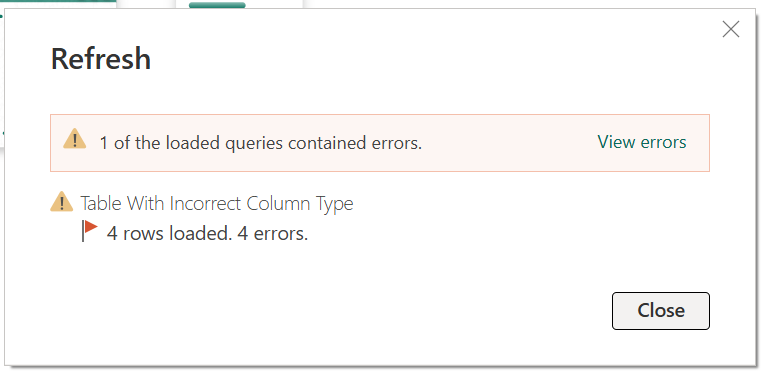
In essence, Power Query’s column types provide a way to communicate a promise about what the column will contain to the destination. Such promises are unenforced (not validated) by the mashup engine—but failure to live up to them may cause problems on the destination side of things (e.g. if the destination cares about column types, it may error if values in the column don’t align with what was promised).
(Side Note: Record field types and list item types are also courtesy information, just like column types. All three exist for the convenience of others but have no effect on changing how the mashup engine works with the respective record, list or table. The concepts describe above apply equally to record field and list item types.)
Table.TransformColumnTypes
How do we resolve the seeming contradiction where column types have no functional effect on the mashup engine (as we discussed above), yet do have an effect when applied using Power Query’s “change type” feature?
When you select “change type,” what happens? Code along the lines of the following is written:
Table.TransformColumnTypes(SomeTable, {{"ID", Int64.Type}, {"Name", Text.Type}, {"Wage", Currency.Type}})
Think about the above for a moment. There, staring us in the face is the answer to this quandary: The mashup engine is not what causes the special effects of “change type” to happen; instead, it’s the function Table.TransformColumnTypes.
The special behaviors of “change type” take place when—because—the function Table.TransformColumnTypes is involved. Nothing special has taken place in the mashup engine; it still doesn’t care what the column’s old or new types are. Rather, it is the logic in Table.TransformColumnTypes that causes the appropriate transformations and validations to take place.
More specifically, Table.TransformColumnTypes does two things. For each column transform that is specified:
- On the table that it outputs, it sets the column type to the specified column type. (From above, we know that this has no behavioral effect on the mashup engine, as column types effectively don’t matter to the engine.)
- For each value in the column, it applies a transformation, if one is needed. These transformations are what perform the conversations and validations.
Normally, the transformation is performed by applying the “.From” method that corresponds with the specified type. So, for example, when Table.TransformColumnTypes is configured to transform a column to Currency.Type, Currency.From will be applied to each value in the column. (This particular .From function converts its input to a number, if needed; rounds it to four decimal digits; and ensures that it falls within the valid range for a currency amount, erroring if it does not.)
There’s no contradiction after all! Column types are courtesy information which have no effect on the mashup engine’s treatment of the table. The transformation and validation behavior that takes place when “change type” is used comes from how Table.TransformColumnTypes works.
Lightweight and Dangerous, or More Expensive but Safer?
When to use which…when to ascribe a new column type and when to transform the column to that type?
Ascription is appropriate when you know with certainty that the column’s values are compatible with the specified type. Ascription is low cost (all that is changed is the table type value; the data in the table is untouched) but high risk if you get it wrong (e.g. the data source may reject the problematic row or even altogether fail the load).
Change type (Table.TransformColumnTypes) has a higher cost (due to the transform that is applied to each value) but lower risk (if a value can be converted to the requested type, it will be converted, ensuring the destination is happy with the value; errors are saved only for those values that can’t be converted).
An example of where ascription could be appropriate would be a table received from a data source with a column typed as any but which you know with 100% certainty will always and only contain text values. Ascribing type text as that column’s type would be low cost and safe. But suppose instead that, while the column should contain text, it possibly could sometimes contain numbers or other values. A “change type” (Table.TransformColumnTypes) on the column would be the correct choice; while it would cost more, it is safer.
Subtype Claims
Before we go, now that we’ve cleared up one confusion, how about another to explore? Above, we encountered values Int64.Type and Currency.Type. M has neither a 64-bit integer type or a currency type; rather, both of these type values correspond with M’s type number, but represent (or convey) different subtype claims. Understanding this additional, potentially confusing topic is important for mastering M’s types. To learn more subtype claims, check out Type Equality.
If you’d like to take a deep dive into the M language via a live, online class, please join me for a Mastering M class.
Note that Microsoft’s implementation of the mashup engine applies a special translation of numbers into dates in the particular context where an Excel spreadsheet is the source (when Excel.Workbook or Excel.CurrentWorkbook are used in the M query).
It picks up dates from Excel in their native format – stored as the number of days since 01 Jan 1900 with the time part of datetime stored as a decimal. It converts those numbers into correct date or datetime values.
Test this by putting a few dates in an Excel workbook and then converting their format to ‘General’ or ‘Number’. Load the result into Power BI, or Fabric, and successfully convert the numbers into dates. The same doesn’t work if the numbers come from a different source, or if the Excel source is combined with a different source before the conversion.
This implies that, although the mashup engine doesn’t care about types in a table, MS’s implementation does at least care about the context when making the conversion. I’d be interested to know if this is a sub-type, under the covers. I had assumed it was related to the table, with some meta-data maybe.
Hi Chris! When you bring the worksheet/table into Power Query, are you applying a “change type” or are you referring to how Power Query automatically recognizes that a number value that represents a date (or date time) in Excel is actually a date (or date time)?